
Many patients book their OPD appointment online through the West Bengal Health portal but later face a common problem — they lose their OPD ticket or forget to download it.
Without the OPD appointment slip, patients may face difficulty during hospital visits. This is why knowing how to re-download or print your WB OPD ticket again is very important.
The WB Health system allows patients to access their booking details again through the official portals wbhealth.gov.in and onlinehmis.wbhealth.gov.in, using basic information like mobile number or patient ID.
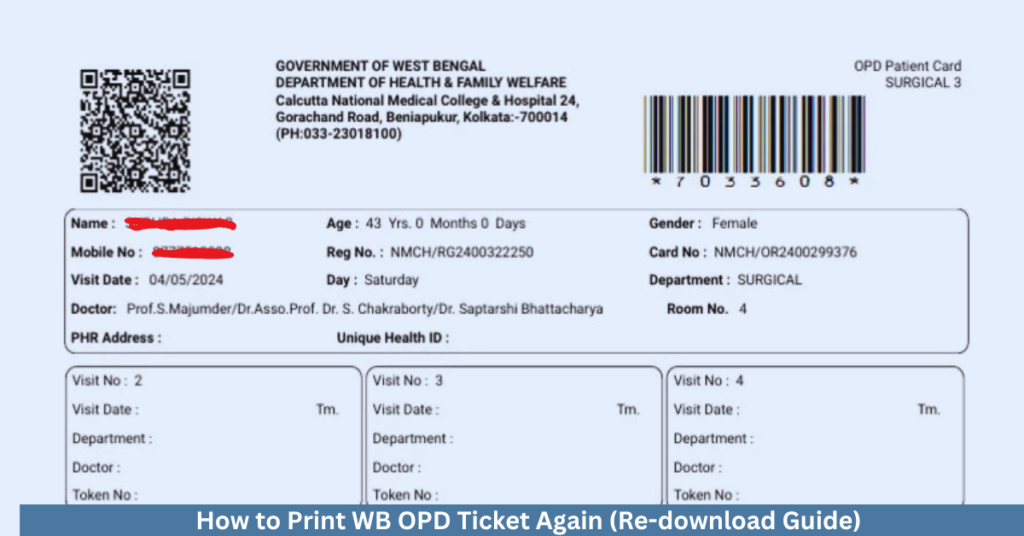
In this guide, we will explain how to print WB OPD ticket again, what details are required, and what to do if you cannot find your appointment.
Can You Re-Download WB OPD Ticket?
Yes 👍 Patients can re-download their OPD ticket if:
- the appointment is still valid
- booking details are available in the system
However, there is no separate “Download Again” button in all cases, so you need to retrieve the booking details first.
Details Required to Print OPD Ticket Again
To access your OPD ticket, keep the following details ready.
| Required Detail | Why It Is Needed |
|---|---|
| Mobile Number | Used for OTP verification |
| Patient ID / Registration Number | Helps locate booking |
| Appointment Date | Identify correct slot |
| Patient Name | Confirms booking details |
How to Print WB OPD Ticket Again (Step-by-Step)
Follow these steps to re-download your appointment slip.
Step 1 – Visit official portal
Open:
https://onlinehmis.wbhealth.gov.in/
Step 2 – Go to OPD Booking section
Click on Online Ticket Booking
Step 3 – Enter mobile number
- Enter your registered mobile number
- Verify using OTP
Step 4 – Retrieve booking details
- System will show your previous booking
- Check patient and hospital details
Step 5 – Download or print ticket
- Open the appointment slip
- Download PDF file
- Print or save it on your phone
Alternative Method (Using Patient ID)
If available:
- Enter Patient ID / Registration Number
- Retrieve booking details
- Download ticket
What If You Cannot Find Your OPD Ticket?
Sometimes users may not see their booking.
Possible reasons:
- wrong mobile number entered
- booking expired
- incorrect patient details
- portal loading issue
How to Fix OPD Ticket Not Found Issue
Try these solutions:
| Problem | Solution |
|---|---|
| Wrong mobile number | Use correct registered number |
| Booking expired | Book new appointment |
| Details mismatch | Re-enter correct details |
| Portal not loading | Try again later or switch browser |
Can You Show Ticket Without Print?
Yes 👍
You can show:
- PDF on mobile
- Screenshot of ticket
Most hospitals accept digital copies.
Tips to Avoid Losing OPD Ticket
Follow these simple tips:
| Tip | Benefit |
|---|---|
| Download immediately | Avoid forgetting later |
| Take screenshot | Quick backup |
| Save PDF file | Easy access anytime |
| Keep SMS confirmation | Extra reference |
Common Related Issues
Patients often face:
- lost OPD ticket
- unable to download slip
- booking not showing
If you face issues, read:
👉 WB Health OPD Booking Not Working – Quick Fix Guide
👉 WB Health Patient ID Explained
Frequently Asked Questions
Can I print OPD ticket after booking?
Yes. You can download and print it anytime before appointment.
What if I lost my OPD ticket?
You can re-download it using mobile number or patient ID.
Is printed ticket compulsory?
No. Digital copy on mobile is usually accepted.
Conclusion
Re-downloading your WB OPD ticket is simple if you have the correct details like mobile number or patient ID. By following the steps above, you can easily retrieve and print your appointment slip without any hassle.
Keeping a backup of your OPD ticket ensures a smooth and stress-free hospital visit.